
ARC Raiders Clip Maker – Turn Gameplay into Shorts
Turn your high-stakes extractions, intense firefights, close escapes, and clutch loot runs into vertical clips for TikTok, YouTube Shorts, and Reels. Keep your health, shield, weapons, and inventory visible with smart HUD layouts that preserve critical extraction context.
Health & Shield Bar (Lower Left)
Essential VitalityCaptures your shield bar and health status, ensuring viewers feel the tension of every extraction shootout and close escape.
Weapons & Ammunition (Lower Right)
Firearm InfoKeeps your active weapon, firing mode, magazine count, and reserve bullets readable in the heat of heavy firefights.
Inventory & Gadgets (Lower Right)
Displays equipped extraction tools, grenades, stims, and gear quick-slots so viewers understand your tactical loadout.
Compass & Extraction Countdown (Top)
Top navigation compass and match countdown remain centered and visible across full gameplay, tracking exfil windows.
Streamer Facecam (Optional)
ToggleableOptionally enable your webcam feed in the upper corner without covering your third-person aiming reticle or line of sight.
Full-resolution 1080×1920 MP4 with zero watermark
Keep Your ARC Raiders HUD Visible in Vertical Clips
Standard vertical cropping hides your health, shield, weapons, and inventory. Gameplay Shorts brings them back without covering the action.
Shield integrity and vital HP stay clearly visible so viewers feel every bullet traded.
Current firearm, fire mode, and reserve ammunition remain in full view on the bottom-right.
Quick-access items, utility equipment, and ordnance stay readable without clutter.
Compass heading and extraction countdown remain centered and legible across the firefight.
Clean 9:16 vertical canvas preserves crosshairs, Raider gunfights, and ARC machine encounters.
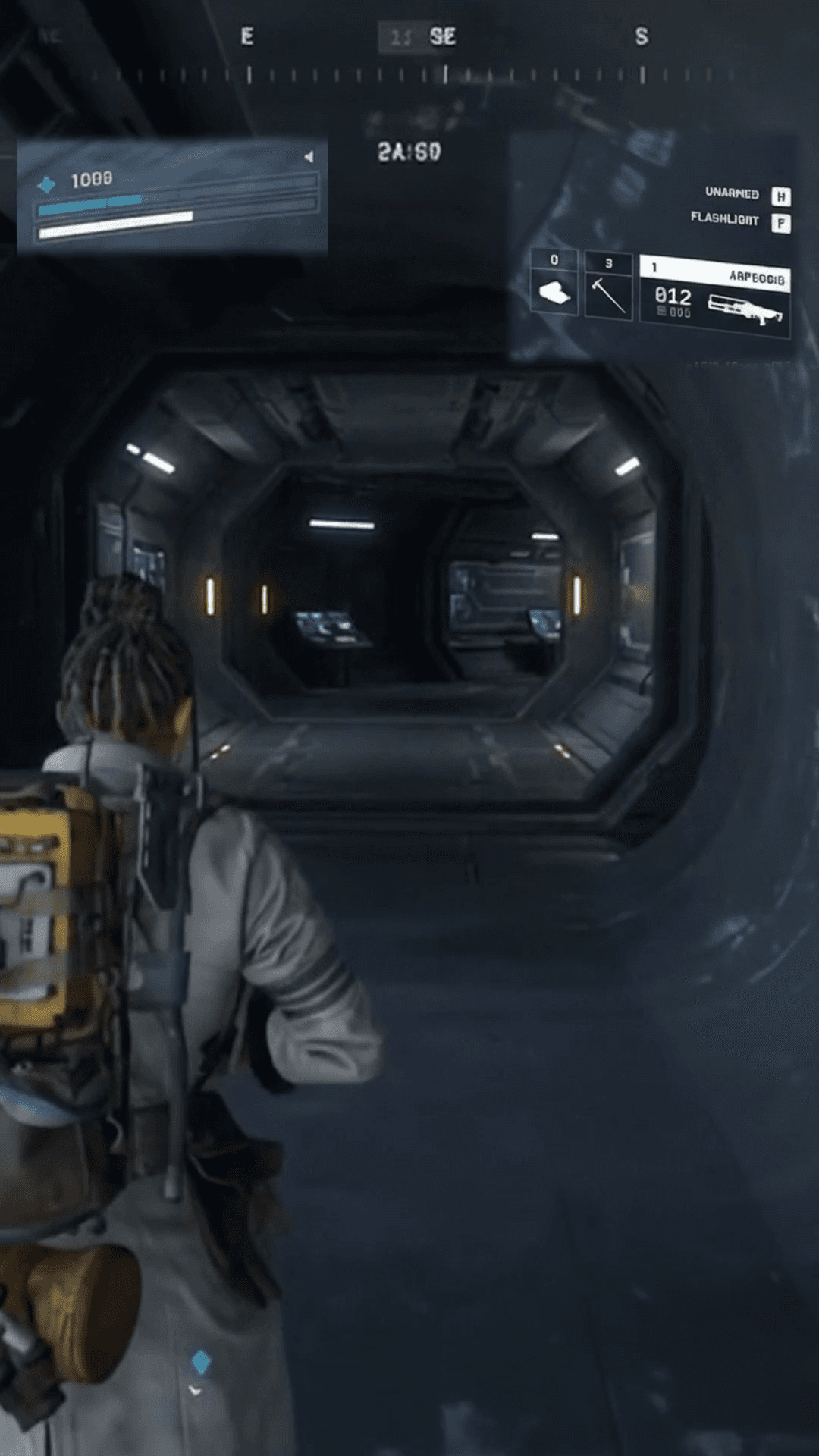
Health, shield, weapons, ammo, and inventory cleanly restored over centered vertical gameplay.
Standard Vertical Crop
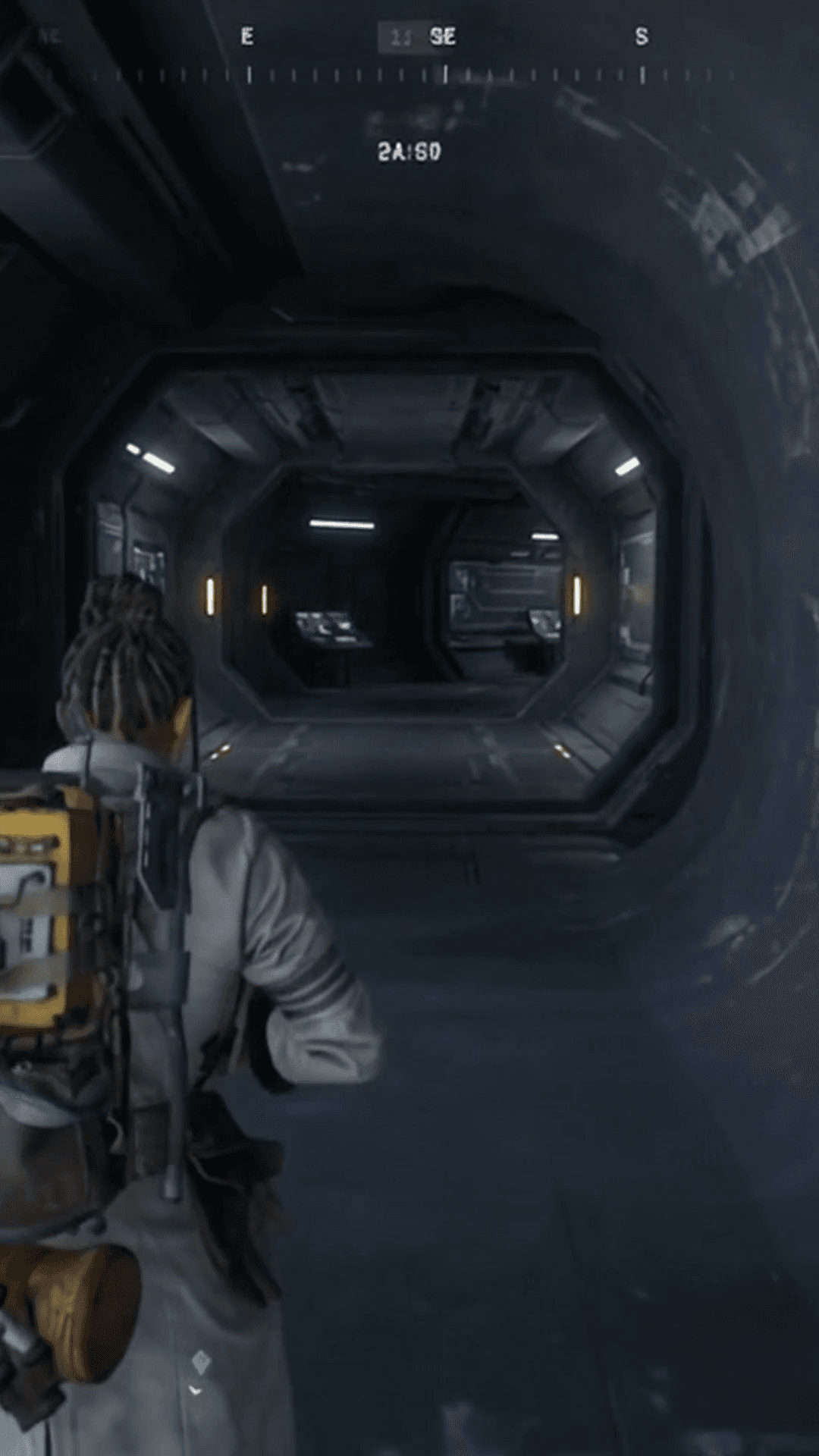
Standard 9:16 center cropping slices away health, shield, and weapons on the sides, leaving viewers guessing if you are about to go down in the firefight.
ARC Raiders Gaming HUD Layout
Restores essential health, shield, ammunition, and gear status around the frame without blocking the intense third-person combat and machine encounters.
Keep Crucial ARC Raiders Information in Every Clip
In extraction shooters, every encounter carries high stakes. When viewers can see your health, shield, weapon status, and gear, every firefight becomes ten times more thrilling.
Health & Shield Tension
In a tense gunfight against rival Raiders or ARC machines, viewers need to see when your shield cracks and your HP is critical. Keeping vitality visible amplifies the drama of every close escape.
Weapons & Firearm Loadouts
Display your equipped weapons, ammunition pool, and fire modes clearly. Viewers instantly understand your tactical choices, reload timings, and clutch bullet conservation.
Inventory & Extraction Tools
Equipped gadgets, grenades, ziplines, and healing stims define high-level extraction plays. Keep quick-slot gear visible without covering your character model.
Compass & Exfil Objectives
The top navigation compass and extraction beacon countdowns stay legible across the vertical frame, giving viewers clear orientation during frantic exfil runs.
Unobstructed Third-Person Aim
Smart HUD positioning keeps the central 9:16 canvas dedicated strictly to third-person movement, recoil control, and precision targeting against mechanized enemies.
Streamer Facecam Integration
Position your webcam reaction neatly in the upper corner with soft edge feathering. Your authentic jumpscares, clutch smiles, and exfil relief stay in frame.
Build Your Own ARC Raiders HUD Layout
Every creator has different preferences. Gameplay Shorts gives you complete granular control over every HUD element with verified center-anchored scaling and soft mask feathering.
Precision X/Y Positioning
Fine-tune widget coordinates with responsive sliders and precision −1 / +1 step buttons. Move health, ammo, and inventory exactly where you want them.
Center-Anchored Widget Size (25%–300%)
Enlarge entire composed widgets up to 300% from their center anchor. Make small UI elements instantly readable on mobile phone screens without edge clipping.
Content Zoom Scale (25%–200%)
Zoom in on specific numbers or icons inside widget slots. Keep ammunition digits crisp and health bars prominent without altering canvas bounding boxes.
Rectangle & Ellipse Masks
Apply vector masks directly to widgets. Isolate the health and shield bar cleanly or extract the ammo counter without blocky background borders.
Shape Feather for Clean Blending
Soften mask borders with adjustable feather radii (0 to 40+ pixels). Eliminate harsh seams so HUD elements blend naturally over vertical combat footage.
Save & Reuse Custom Layouts
Save your verified layout to your account under ARC Raiders. Every time you create a new Short, load your personal layout in one click with zero reconfiguration.
Every coordinate, scale, and mask feather you set in the interactive browser preview is preserved bit-for-bit in the final high-definition export.
How to Create ARC Raiders Shorts in 3 Steps
Transform a multi-hour stream or gameplay file into ready-to-post vertical Shorts in three straightforward steps.
Upload or Paste Twitch VOD
Upload an MP4, MOV, or WebM gameplay clip from your computer or paste your Twitch VOD URL directly. Gameplay Shorts scans excitement signals without requiring a local video download.
Apply the ARC Raiders HUD Preset
Select Gaming HUD layout mode and choose ARC Raiders. Health, shield, weapons, ammo, and inventory widgets are instantly aligned to your vertical canvas.
Preview & Export in 1080×1920
Add optional speech-to-text captions, preview the video in real time, and render a watermark-free 1080×1920 60FPS MP4 ready for YouTube Shorts, TikTok, and Reels.
Flexible Layout Formats for Any ARC Raiders Moment
In addition to the Gaming HUD Editor, Gameplay Shorts supports multiple layout options to fit any extraction scenario:
Full 9:16 gameplay with floating health, shield, weapons, ammo, and inventory.
Classic stacked layout: 1080×640 streamer webcam on top and 1080×1280 gameplay below.
Full vertical crop with horizontal panning to focus strictly on central third-person gunplay.
Full 16:9 gameplay centered against a synchronized blurred background.
Centers the complete 16:9 frame with clean dark letterboxing above and below.
Add Captions for Intense Extraction Callouts
Extraction shooter callouts happen in split seconds over heavy gunfire. Synchronized subtitles ensure viewers catch every exfil order, enemy Raider callout, and punchline.
Clean
High-contrast white typography with soft drop shadows designed for quick readability over gameplay.
Bold
Heavy lettering with thick black outlines built for loud exfil panic and explosive streamer shouts.
Gaming
Vibrant colored highlights designed for fast-paced squad chatter and tactical comms.
Karaoke
Word-by-word active highlighting synchronized with your voice, drawing viewer eyes to every word.
Turn Your ARC Raiders Extractions into Viral Shorts
Start with 2 free VOD hours. Paste your ARC Raiders Twitch stream or upload gameplay, apply our verified 9:16 Gaming HUD layout, and export clean, watermark-free vertical Shorts in minutes.
2 VOD hours free for new eligible accounts • Dedicated ARC Raiders Gaming HUD Preset • Watermark-free 1080×1920 MP4
Frequently Asked Questions
What is the ARC Raiders Clip Maker?
Which ARC Raiders HUD elements can I reposition and display?
Why does standard vertical cropping hurt ARC Raiders gameplay clips?
In the ARC Raiders screenshots, why are the compass and timer already at the top?
Does Gameplay Shorts automatically detect ARC Raiders extractions or loot with AI?
Can I import ARC Raiders streams directly from Twitch without downloading?
Can I keep my streamer facecam visible in vertical ARC Raiders clips?
Can I customize, resize, and save my own ARC Raiders HUD layout?
Can I add captions and subtitles to my ARC Raiders clips?
Is it free to try with an ARC Raiders stream or clip?
Gameplay Shorts is an independent tool and is not affiliated with or endorsed by Embark Studios or ARC Raiders.