
CS:GO Clip Maker with Custom Gaming HUD
Turn Counter-Strike: Global Offensive (CS:GO) gameplay and Twitch VODs into vertical Shorts, TikToks, and Reels. Customize facecam, health, scoreboard, and weapons with our dedicated 9:16 Gaming HUD editor — then save your layout for future clips.
Streamer Facecam (Top Compact)
Positioned at the top of the canvas, keeping streamer reactions clear without blocking the central crosshair.
Match Scoreboard & Timer
SelectedCaptures round score, alive player counts, and bomb countdown with high-contrast feathered masking.
Health, Armor & Chat (Bottom-Left)
Shows critical remaining HP, armor points, and teammate tactical radio text during clutches.
Weapons, Ammo & Grenades (Bottom-Right)
Displays primary rifle, magazine ammo count, secondary sidearm, and utility grenades.
Full-frame 9:16 gameplay with scoreboard, health, weapons, and compact facecam.
See the Difference: Standard Layout vs Gaming HUD
Standard vertical crop templates crush peripheral HUD elements and drown the action under an oversized webcam. Gaming HUD brings the match scoreboard, health, weapon info, and compact facecam back into your vertical CS clips.
Webcam stays compact at the top without eating into crosshair view.
Round count, match score, and timer remain readable in every clip.
Clutch health and teammate callouts framed crisply above the lower border.
Primary rifle, sidearm, ammo count, and economy clearly visible.
Clean vertical canvas puts crosshair placement and gunfights front and center.
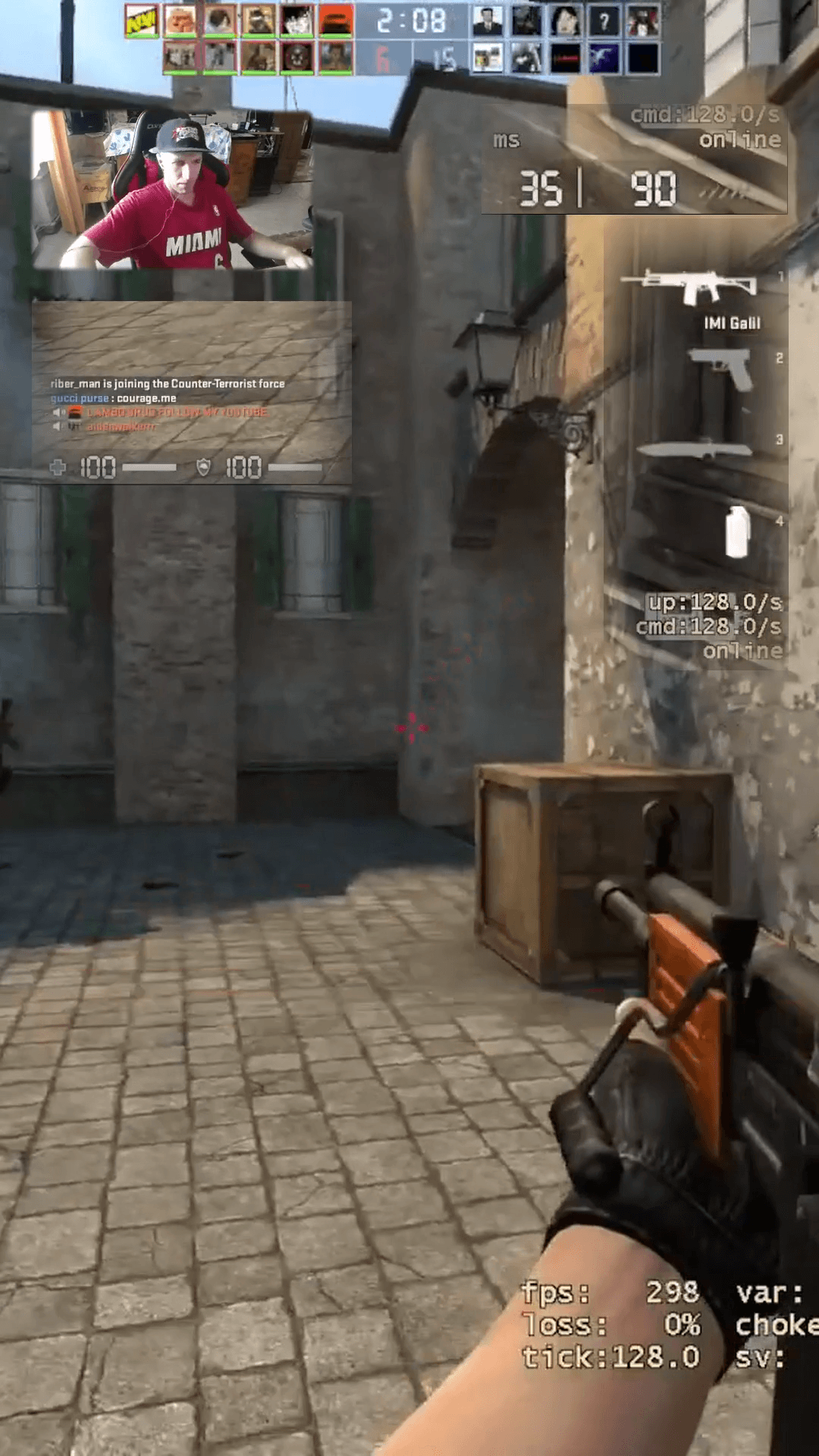
Scoreboard, health, weapons, and compact facecam preserved over full gameplay.
Standard Facecam Layout
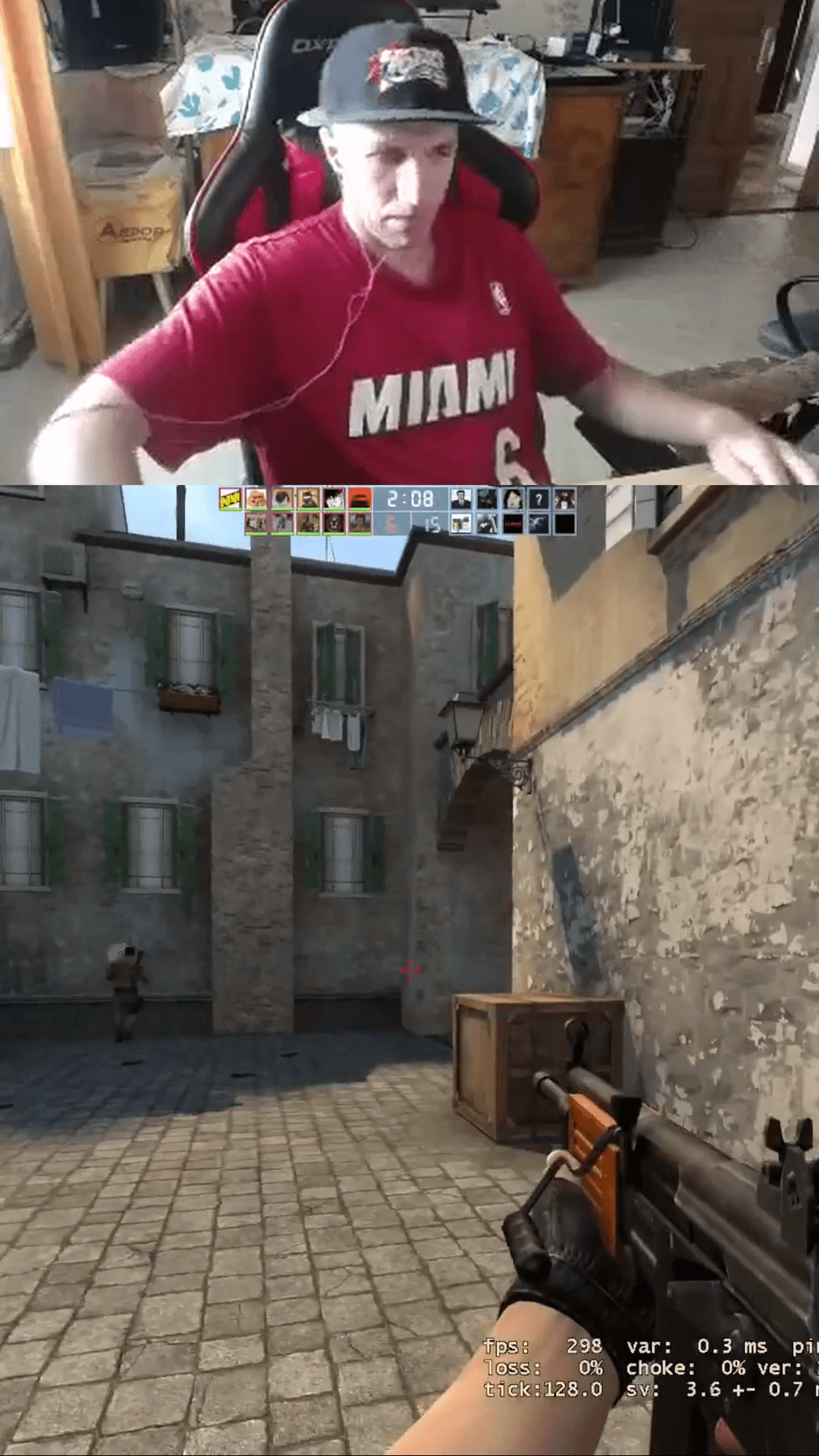
Oversized webcam covers key visual real estate while match scoreboard, health, and weapon info fall outside the vertical frame.
Custom Gaming HUD Layout
More space dedicated to gameplay. Facecam is streamlined, scoreboard stays on top, HP on left, and weapon HUD on right.
Keep Crucial Counter-Strike Information in Every Clip
When viewers watch a vertical CS clutch on TikTok or Shorts, they need context to appreciate the play. Without round scores, health bars, and ammo counts, dramatic 1v3 clutches lose their stakes.
Streamer Facecam
Keep your webcam visible and expressive without dominating the entire video. Size and position the facecam at the top to preserve line-of-sight on gameplay.
Match Scoreboard & Timer
Display match rounds (14-15), remaining round seconds, and alive player counters. Viewers instantly see the high-stakes match point context.
Health & Armor Status
Show surviving hit points and helmet/armor status. Nothing builds viewer tension faster than seeing a player clutch a round with only 12 HP remaining.
Weapon Information & Ammo
Keep active weapon names, remaining magazine bullets, reserve ammo, and utility grenades readable. Viewers know exactly when an empty magazine forces a pistol swap.
Chat & Tactical Comms
Frame in-game team chat messages, location callouts, and economy info directly above the lower frame so tactical coordination stays part of the story.
Unobstructed Crosshairs
By floating HUD widgets cleanly at the borders with feathering, the entire center of the 9:16 video remains dedicated to recoil control, flicks, and crosshair placement.
Build Your Own Gaming HUD Layout
Gameplay Shorts gives you complete manual control over HUD composition. No unpredictable AI crop guesses—you define the exact crops, scales, positions, and masks for your gameplay clips.
Independent HUD Widgets
Crop any section of your 16:9 stream into an independent widget. Move and scale Facecam, Scoreboard, Health, and Weapons independently without affecting the base gameplay stream.
Precision Source Crop Selection
Adjust X/Y percentages and crop dimensions with live visual bounds. Isolate tight HUD elements down to the exact pixel regardless of whether your source clip is 720p, 1080p, or 1440p.
Position & Size Adjustments
Fit modes support Cover and Contain with adjustable scale from 50% to 100%. Position widgets anywhere across the 1080×1920 canvas to match your personal short-form aesthetic.
Rectangle, Ellipse & Diamond Masks
Apply vector masks directly to widgets. Remove blocky black borders and isolate round radar circles, rectangular scorebars, or custom icons with crisp alpha channels.
Shape Feather for Clean Edges
Soften mask borders with adjustable feather radii (0 to 40+). Eliminate harsh seams so your HUD overlays blend naturally into the action below.
Save & Reuse Custom Layouts
Save your verified layout to your account under Counter-Strike. Every time you edit a new clip, load your custom layout in a single click with zero reconfiguration.
Every coordinate you set in the interactive browser preview is preserved bit-for-bit in the final FFmpeg render.
How to Create Counter-Strike Shorts
Transform a multi-hour stream or gameplay file into ready-to-post vertical Shorts in three straightforward steps.
Upload or Paste Twitch VOD
Upload an MP4 gameplay clip from your computer or paste your Twitch VOD URL directly. Gameplay Shorts scans highlight signals without requiring a local download.
Customize Your Gaming HUD
Select Gaming HUD layout mode. Position facecam, scoreboard, health bar, and weapons, or load a saved layout to apply your verified styling instantly.
Preview & Export in 1080×1920
Add optional speech-to-text captions, preview the video in real time, and render a watermark-free 1080×1920 MP4 ready for YouTube Shorts, TikTok, and Reels.
Flexible Layout Formats for Any Counter-Strike Moment
In addition to the Gaming HUD Editor, Gameplay Shorts supports multiple layout options to fit any stream scenario:
Full 9:16 gameplay with floating scoreboard, health, weapons, and compact facecam.
Classic stacked layout: 1080×640 streamer webcam on top and 1080×1280 gameplay below.
Full vertical crop with horizontal panning to focus strictly on crosshairs and gunfights.
Full 16:9 gameplay centered against a synchronized blurred background.
Centers the complete 16:9 frame with clean dark letterboxing above and below.
Add Captions for Fast-Paced Match Comms
Counter-Strike callouts are fast, intense, and often inaudible when viewers watch on mute. Synchronized captions keep every reaction, callout, and round reaction readable.
Clean
High-contrast white typography with soft drop shadows designed for quick readability over gameplay.
Bold
Heavy lettering with thick black outlines built for high-energy clutches and loud streamer shouts.
Gaming
Vibrant colored highlights designed for fast-paced team chatter and competitive banter.
Karaoke
Word-by-word active highlighting synchronized with your voice, drawing viewer eyes to every punchline.
Turn Your CS Gameplay into Vertical Shorts
Start with 2 free VOD hours. Paste your Counter-Strike Twitch stream or clip, customize your 9:16 Gaming HUD layout, and export clean, watermark-free vertical Shorts in minutes.
2 VOD hours free for new eligible accounts • Dedicated CS Gaming HUD Editor • Watermark-free 1080×1920 MP4
Frequently Asked Questions
What is the CS Gaming HUD Editor?
Which Counter-Strike HUD elements can I reposition?
Can I save my custom CS HUD layout for future clips?
How does masking and shape feathering work on CS widgets?
Does Gameplay Shorts automatically detect CS in-game events with AI?
Can I import Counter-Strike streams directly from Twitch without downloading?
Can I keep my streamer facecam visible in vertical clips?
Can I add captions to my CS clips?
What resolution does Gameplay Shorts export?
Is it free to try with a CS stream?
Gameplay Shorts is an independent tool and is not affiliated with or endorsed by Valve Corporation or Counter-Strike.